 CodaKeys
How to
Get mix help that stays editable
Muddy low mids, a vocal that sits too far back, a mix with no space. In CodaKeys you can ask Claude to fix it, and what comes back is ordinary mixer settings on your own tracks: faders, pans, effects and sends you can open, change and undo. Nothing is bounced or flattened.
Ask for a review
Where /ck-mix-check in the Claude panel
You need the same things as for every Claude feature in CodaKeys: a Mac with Apple silicon on macOS 13 or later, and Claude Code signed in with your own Claude plan. The Guide covers it. CodaKeys is an invitation-only beta, free while it lasts.
Type /ck-mix-check and a few words about the problem, such as “the chorus sounds muddy” or “the vocal is buried”. You can also just say it in your own words and Claude picks the same way of working. With no focus, it reviews the whole balance.
An empty or one-track song has nothing to balance, and Claude says so instead of inventing work.
What Claude does first
Claude looks before it touches anything: what each track plays, what effects are already on it, the levels and the spectral balance, and which tracks have no space around them. It measures the tracks that matter rather than guessing from the names.
Then it proposes a short plan, one line per move with the reason, such as “vocal down 2 dB and a high-pass at 100 Hz, because it is masking the keys”. Moves are small: cuts before boosts, a dB or two before big changes, and pan before EQ when two parts fight for the same room.
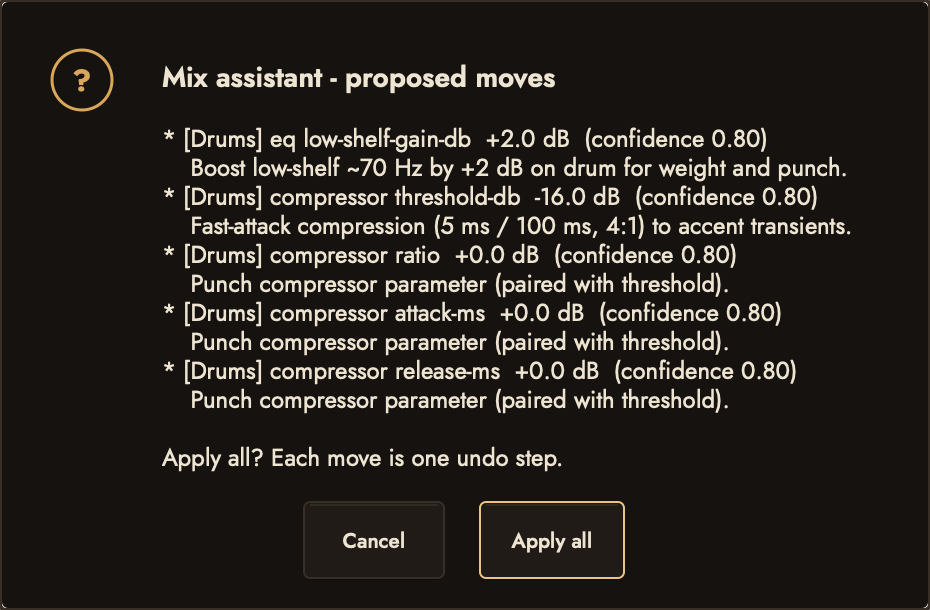
If you would rather see candidates yourself, Mix › Suggest Mix Moves... lists ranked ideas for a goal such as more punch or less mud, each with the reason, and you apply the ones you want.
Save a way back first
Before a mix pass Claude stores the whole mix surface (every fader, pan, mute, solo and send) as snapshot A, and the result as snapshot B. The A and B buttons in the mixer’s top bar each open a menu: choose Recall to hear that mix, so you can compare before and after by ear and keep the one you like.
A snapshot holds levels, pans and sends, not effects. An equaliser or compressor Claude added stays on the track in both, so bypass it to hear the track without it.
If you want a save-point that outlasts the session, ask for /ck-checkpoint first. Undo lasts while the song stays open; a checkpoint stays.
What the moves look like
Everything lands where you would put it by hand. Open Mixer (the button, or Mix > Show Mixer) and each change is on its channel:
- Levels and pans: faders and pan knobs, moved a little.
- Effects: an equaliser or compressor on a track’s insert slots, with its settings set. Click the slot to open it.
- Space: one shared reverb on its own return track, with each part sent to it at a low level, rather than a reverb on every track.
- Ducking: a compressor on the bass keyed from the kick, for example.
When Claude makes an EQ cut it can open the Track EQ with the track’s live spectrum behind the curve, so you see what the cut removes while you listen.
Check it and undo what you don’t like
Claude measures the touched tracks again and tells you what changed, and reverts a move that did not help. Your ears have the last word: loop the section, then recall A and B in turn.
- Bypass one effect to hear what it does, or remove it.
- Move any fader or setting yourself. They are your settings now.
- Press ⌘Z to take back the last change, or say “put it back”. Claude’s changes are on the same undo list as yours.
Claude’s changes are listed in the song’s versions with “Claude:” in front, so you can see later what it did.
Then what
Mixing is not mastering. When the balance is right and you want a file to share, ask for /ck-finish, which walks the song to an export. Not signed up yet? Ask for the beta on the home page. The rest of what CodaKeys does is on Features.